YTD — CLI terminal video downloader with a live preview
ytd is a thin wrapper around yt-dlp.
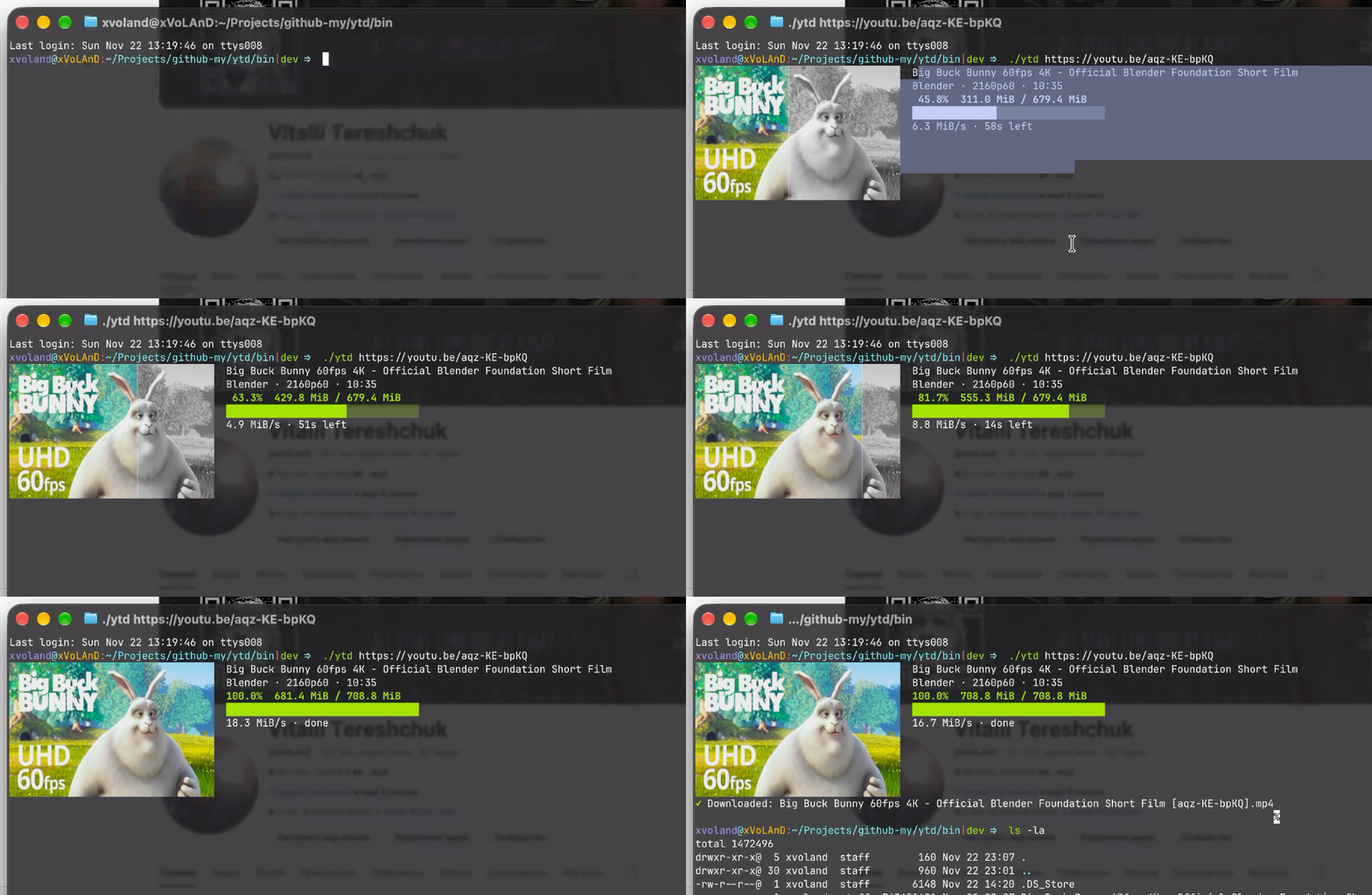
It downloads videos from the terminal and shows a thumbnail that gains colour
as the download progresses: it starts fully grayscale and reaches full colour
at 100%. The thumbnail is the progress indicator.
How it works
ytdrunsyt-dlp -J --skip-download <your arguments>to get the title, channel, duration, resolution and thumbnail URL — without downloading the video.- The thumbnail is fetched and resized to the reserved terminal area.
yt-dlpstarts downloading with a custom--progress-template, so progress arrives as structured, machine-readable lines instead of a terminal progress bar.- The image itself is the progress bar: its coloured region grows from the
left as the download advances, while the rest stays grayscale. In Kitty the new frame
is transmitted with a fresh image ID and placed on top of the current one;
only after that is the old ID deleted — no blank frame and no cursor
movement. Text is updated line-by-line (
ESC[Kfrom the text column), so the image cells are never cleared. Kitty is used by default:ytdchecks the terminal first and falls back to iTerm2 or ANSI text if the graphics protocol is not supported. - When the download finishes, a final full-colour frame is shown together with
the output filename. The image stays on screen after
ytdexits; only on a failed download is the card removed.
Everything that ytd does not recognise is passed to yt-dlp unchanged, so
all of yt-dlp's options, format selectors, cookies, proxies, etc. keep working.
Requirements
- Go 1.25+ (to build from source)
yt-dlpinstalled and available inPATH(or use--ytdlp)- A terminal with image support is recommended; plain text works everywhere
Installation
Homebrew (macOS / Linux)
brew tap xvoland/ytd
brew trust xvoland/ytd   # one time: third-party taps are untrusted by default
brew install ytd
brew trust is required by Homebrew for any non-core tap; run it once per
machine. Without it Homebrew refuses to load the formula with
«Refusing to load formula ... from untrusted tap».
The formula builds from the tagged source and ad-hoc signs the macOS binary
(codesign --force --timestamp=none --sign -) at install time, then removes the
quarantine attribute. Gatekeeper therefore accepts it without the
«developer cannot be verified» prompt. yt-dlp is installed as a dependency.
Upgrade with brew upgrade ytd.
Go
go install github.com/xvoland/ytd@latestPrebuilt binaries
Every v* tag triggers a release build with binaries for 10 platforms and a
checksums.txt. macOS binaries in the release are ad-hoc signed as well.
Or build locally:
./build.sh local     # produces ./bin/ytd
./bin/ytd --help
./build.sh all cross-builds every supported platform into dist/;
./build.sh platforms prints the OS/terminal support matrix.
Usage
# Simple download
ytd <div class="video-container"><iframe src="https://www.youtube.com/embed/VIDEO_ID" frameborder="0" allowfullscreen></iframe></div>

# Pick a format with any yt-dlp option
ytd -f 'bestvideo[height<=1080]+bestaudio/best' <div class="video-container"><iframe src="https://www.youtube.com/embed/VIDEO_ID" frameborder="0" allowfullscreen></iframe></div>

# Use cookies from your browser
ytd --cookies-from-browser firefox <div class="video-container"><iframe src="https://www.youtube.com/embed/VIDEO_ID" frameborder="0" allowfullscreen></iframe></div>

# Force the Kitty graphics protocol and a wider thumbnail
ytd --mode kitty --width 36 <div class="video-container"><iframe src="https://www.youtube.com/embed/VIDEO_ID" frameborder="0" allowfullscreen></iframe></div>

# Progress card without a thumbnail
ytd --no-preview <div class="video-container"><iframe src="https://www.youtube.com/embed/VIDEO_ID" frameborder="0" allowfullscreen></iframe></div>

# Use a yt-dlp binary from a non-standard location
ytd --ytdlp /usr/local/bin/yt-dlp <div class="video-container"><iframe src="https://www.youtube.com/embed/VIDEO_ID" frameborder="0" allowfullscreen></iframe></div>
Use -- to stop ytd from interpreting further arguments:
ytd -- <div class="video-container"><iframe src="https://www.youtube.com/embed/VIDEO_ID" frameborder="0" allowfullscreen></iframe></div> --some-future-yt-dlp-flagCLI options
| Option | Environment | Default | Description |
|---|---|---|---|
--mode <name> |
YTD_MODE |
auto |
Renderer to use. See Display modes for every accepted value and the detection algorithm. |
--width <cells> |
YTD_WIDTH |
auto | Thumbnail width in terminal cells (not pixels). Height is derived from the thumbnail aspect ratio. See Image size. |
--cell-width <n> |
YTD_CELL_WIDTH |
10 |
Assumed pixel width of one terminal cell. Used only to rasterize the PNG sent to the terminal; it does not resize the terminal. |
--cell-height <n> |
YTD_CELL_HEIGHT |
20 |
Assumed pixel height of one terminal cell. |
--no-preview |
— | off | Skip fetching the thumbnail entirely. The text card still shows title, metadata and progress; no image area is reserved. |
--ytdlp <path> |
YTD_YTDLP |
yt-dlp |
yt-dlp executable. Checked with exec.LookPath before anything else; may be an absolute path. |
--debug |
— | off | Log the exact metadata/download commands, thumbnail errors, timing, and print collected yt-dlp output after finishing. |
--version, -V |
— | — | Print version and copyright, then exit. |
--help, -h |
— | — | Print help (includes the copyright line) and exit. |
-- |
— | — | Stop interpreting the remaining arguments as ytd options. |
| anything else | — | — | Forwarded to yt-dlp verbatim, in the original order. |
With no arguments ytd prints the version and copyright banner and exits with
status 1.
Exit codes
| Code | Meaning |
|---|---|
0 |
Success |
1 |
yt-dlp or other runtime failure (including Ctrl+C) |
2 |
Usage error: no URL, or an invalid ytd option value |
127 |
Required dependency (yt-dlp) not found |
130 |
Interrupted with ESC or Ctrl+C (128 + SIGINT) |
Diagnostics go to stderr; the progress card and help/banner go to stdout.
Press ESC (or Ctrl+C) at any time during the download to interrupt it. The
terminal is briefly switched to raw mode while ytd runs so ESC is delivered
immediately; settings are restored before the Cancelled by user message and
any yt-dlp diagnostics are printed, so the output stays aligned. Arrow-key
escape sequences are ignored.
Environment variables
Priority is always explicit CLI flag > environment variable > built-in default. Environment variables are useful for a shell profile or a service:
export YTD_MODE=kitty
export YTD_WIDTH=36
export YTD_YTDLP=/opt/homebrew/bin/yt-dlp| Variable | Accepted values | Effect |
|---|---|---|
YTD_MODE |
auto, kitty, tgp, iterm, iterm2, text, ansi, plain, none |
Same as --mode. Any other value behaves like auto. |
YTD_WIDTH |
whole number of cells (e.g. 36) |
Same as --width. A non-numeric value is ignored. |
YTD_YTDLP |
executable name or path | Same as --ytdlp. |
YTD_CELL_WIDTH |
positive integer | Same as --cell-width. |
YTD_CELL_HEIGHT |
positive integer | Same as --cell-height. |
Display modes
--mode / YTD_MODE accepts the following values (aliases are equivalent):
| Value | Aliases | Renderer |
|---|---|---|
auto |
(default) | Detect support and pick the best renderer, see below. |
kitty |
tgp |
Kitty Terminal Graphics Protocol. Forced without probing. |
iterm |
iterm2 |
iTerm2 native inline images (OSC 1337; File=...). Forced without probing. |
text |
ansi |
ANSI half-block characters (▀), 24-bit colour if COLORTERM contains truecolor/24bit, otherwise 256 colours. |
plain |
none |
A single updating text line, no image. |
How auto works
- If stdout is not a TTY (pipe, log file, CI) →
plain. - If
TERM_PROGRAMisGhosttyorWezTerm, orTERM=xterm-kitty, orKITTY_WINDOW_IDis set →kittyimmediately (no probe needed). - If
TERM_PROGRAM=iTerm.app→ probe Kitty support; on success usekitty, otherwise use iTerm2's native protocol. - Otherwise probe Kitty support; on success use
kitty, otherwisetext.
The probe sends a Kitty query action (a=q,f=100,t=d with a 1×1 PNG) to the
terminal and waits up to 400 ms for an OK acknowledgement. It does not store
an image or change what is on screen. Replies are read from /dev/tty on Unix
and CONIN$ on Windows.
Forcing a mode skips detection: --mode kitty in a terminal without support
will print escape sequences that the terminal may display as garbage.
Supported terminals
| Terminal | Platforms | Result with auto |
|---|---|---|
| kitty | Linux, macOS, FreeBSD | Full image — Kitty graphics protocol, detected via TERM=xterm-kitty / KITTY_WINDOW_ID |
| Ghostty | Linux, macOS | Full image — Kitty graphics protocol, TERM_PROGRAM=Ghostty |
| WezTerm | Linux, macOS, Windows, FreeBSD, NetBSD | Full image — Kitty Image Protocol enabled by default; TERM_PROGRAM=WezTerm |
| iTerm2 | macOS | Full image — probed for Kitty protocol, falls back to native OSC 1337 inline images |
| Any other terminal implementing the Kitty/TGP protocol | — | Full image — found by the automatic 400 ms probe |
| Terminal.app, Apple Terminal, Konsole, GNOME Terminal, xterm, Alacritty, rxvt, Windows Terminal, Linux console | — | ANSI preview — half-block image with 24-bit or 256 colours |
| tmux / GNU screen | — | ANSI preview unless escape-sequence passthrough is enabled (allow-passthrough on in tmux) |
| Pipe, log file, CI, no TTY | — | Plain single-line progress, no image |
Notes:
- Windows Terminal supports Sixel, but
ytddoes not implement Sixel — such terminals get the ANSI half-block preview. Use--mode textexplicitly if auto-detection does not recognise your terminal. - WezTerm's Kitty implementation does not support animation frames;
ytddoes not use them. - The table describes the renderer. All terminals can run
ytd; only the visual richness differs.
Image size
--width/YTD_WIDTHis measured in terminal cells, not pixels.- If unset, the width is
term_columns / 3, clamped to 20–34 cells (ormax(12, term_columns/2)on narrow terminals), then limited toterm_columns - 4. - Height in rows is computed from the thumbnail's aspect ratio, clamped to
5–14 rows and to
term_rows - 4. --cell-width/--cell-heightonly control the pixel resolution of the PNG raster (default10×20px per cell). Increase them for a sharper image on a high-DPI display; decrease them to transmit less data.
ytd --width 36 --cell-width 12 --cell-height 24 <div class="video-container"><iframe src="https://www.youtube.com/embed/VIDEO_ID" frameborder="0" allowfullscreen></iframe></div>Passing options to yt-dlp
ytd makes two yt-dlp calls: yt-dlp -J --skip-download ... for metadata, then
the actual download. Arguments that conflict with those calls (--print,
-q, -o, --simulate, JSON dump flags, etc.) are removed from the
corresponding invocation; everything else is passed through unchanged. ytd
appends its own --progress, --newline, --color never and
--progress-template, which take precedence. See Troubleshooting
if yt-dlp returns 403 — ytd retries once with an explicit player client.
Rendering details
The thumbnail itself is the progress bar: the coloured region grows from the
left while the rest stays grayscale, with a subtle (25% brightness) white line
marking the boundary. Kitty updates use double buffering — a frame with a new
image ID is placed on top of the previous one, which is deleted only
afterwards, so there is no blank frame and no cursor movement (C=1). Text is
overwritten in place without ESC[K erase steps. When the download succeeds,
the final full-colour image stays on the screen; a failed download clears the
card instead.
Troubleshooting
ERROR: unable to download video data: HTTP Error 403: Forbidden
YouTube sometimes rejects the CDN URL for the selected format. This is a
yt-dlp/YouTube issue, not a rendering problem. Retry, or give yt-dlp a fresh
player client or your browser cookies:
ytd --extractor-args 'youtube:player_client=web' <div class="video-container"><iframe src="https://www.youtube.com/embed/VIDEO_ID" frameborder="0" allowfullscreen></iframe></div>
ytd --cookies-from-browser firefox <div class="video-container"><iframe src="https://www.youtube.com/embed/VIDEO_ID" frameborder="0" allowfullscreen></iframe></div>
Releases and Homebrew
Pushing a v* tag triggers .github/workflows/build.yml. It builds all ten
targets, ad-hoc signs the macOS binaries (codesign --force --timestamp=none --sign -), refreshes checksums.txt afterwards, and attaches every binary to
a GitHub Release. Automatic builds run only on v* tag pushes; to build at
any time from any ref, run the build workflow manually via workflow_dispatch
(no Release is created unless it is dispatched on a tag).
The update-tap job updates url, sha256 and version in
Formula/ytd.rb
in the xvoland/homebrew-ytd tap on every v* tag push. The formula signs the
binary with codesign --sign - and strips quarantine via xattr -dr com.apple.quarantine after building, so Homebrew installs an accepted binary
without extra user steps. The job needs the TAP_TOKEN secret and never fails
the release.
Development
./build.sh test       # go test ./...
./build.sh local      # build ./bin/ytd with the current git tag
./build.sh all        # cross-build all targets + checksums
./build.sh platforms  # supported OS/terminal matrix
gofmt -w *.go
./build.sh embeds git describe --tags into ytd --version; a plain
go build reports x.x.x (local).
Benchmarks
./build.sh bench                 # COUNT=10, writes bench.txt
benchstat bench.txt              # statistical summary
The hot path is the per-frame image update. Reference numbers
(Apple M2 Pro, darwin/arm64, -benchmem -count=10, benchstat):
| Benchmark | sec/op | B/op | allocs/op |
|---|---|---|---|
ApplyProgressWipe/w=240 |
50.7µ ± 1% | 88.1 KiB | 2 |
KittyTransmit (encoding every call) |
714.4µ ± 0% | 1.07 MiB | 29 |
KittyTransmitCached (real hot path) |
117.3n ± 2% | 132 B | 2 |
ITermPlace (encoding every call) |
720.4µ ± 0% | 1.06 MiB | 26 |
RenderHalfBlocks |
222.3µ ± 0% | 85.3 KiB | 78 |
ParseProgressLine |
322.8n ± 0% | 192 B | 2 |
ProgressTrackerUpdate |
52.1n ± 0% | 0 B | 0 |
Per-frame encoding is avoided on the hot path: the wipe is cached by whole percent (at most 101 frames, ~4 KB each), so a repeated frame costs ~117 ns and 132 B instead of ~714 µs and 1 MiB. A new percent still pays one encoding, i.e. at most ~72 ms of encoding work spread across an entire download.
Copyright
Copyright © 2026, Vitalii Tereshchuk
- Youtube: https://youtube.com/@xvoland
- GitHub: https://github.com/xvoland/ytd
- Buy on Gumroad: https://lor4ik.gumroad.com/l/ytd
- Donation: https://paypal.me/xvoland
- Patreon: https://patreon.com/xvoland