
X Audio Space Recorder — Record & Download X Spaces CLI
X Space Recorder is a practical, self-hosted tool for recording Audio X Spaces as high-quality audio while they're live or downloading available replays afterward.
Important: This is an unofficial third-party tool. It is not affiliated with, endorsed by, or sponsored by X Corp.
Try the Demo
Want to try it before you buy?
Download the demo version and test the CLI utility on your own setup before purchasing the full version.
Cross-Platform Demo
Demo binaries for:
The demo is designed to let you experience the core recording workflow and make sure the tool works for your environment.
What You Get
🎙️ High-quality audio recording
Record live Spaces in real time or download available replays.
- Live recording with automatic segment downloading
- Full replay downloads when a replay is available
- M4A output without audio re-encoding (ffmpeg)
- Embedded metadata
- Host profile picture embedded as cover art
- Automatic cleanup of embedded Twitter/X segment metadata
🔄 Live → Replay
Don't worry about missing the beginning or ending up with an incomplete recording.
When a live Space ends, the recorder can automatically wait for the replay to become available. If the full replay appears, it downloads it and replaces the live recording with the complete version.
The default replay wait time is 15 minutes, and you can change or disable it.
Key Features
| Feature | Included |
|---|---|
| Record live X Spaces | ✅ |
| Download Space replays | ✅ |
| Live → automatic replay replacement | ✅ |
| High-quality M4A output | ✅ |
| Cover art embedding | ✅ |
| Metadata embedding | ✅ |
| Automatic filenames | ✅ |
| Graceful Ctrl+C shutdown | ✅ |
| Parallel-safe recordings | ✅ |
| Cookie authentication | ✅ |
| OAuth 2.0 Space search | ✅ |
| Browser-based UI recording | ✅ |
| Cross-platform builds | ✅ |
Automatic File Naming
You don't have to manually name every recording.
If no output filename is provided, the recorder automatically creates a useful filename based on available Space metadata:
- Space title
- Host display name
- Host username
- Fallback filename
A timestamp is automatically added to prevent accidental overwrites.
Example:
Space_Title_20260725-123456.m4aSimple CLI Workflow
Simple Record a Space
./x-recorder -s https://x.com/i/spaces/...Record a Space
./x-recorder -c cookies.txt -s https://x.com/i/spaces/...Specify an output file
./x-recorder -c cookies.txt -s https://x.com/i/spaces/... -o my-recording.m4aAuthentication
Cookie authentication
The simplest option for downloading specific Spaces.
- Log in to X in your browser.
- Export your cookies in Netscape format.
- Save them as
cookies.txt. - Pass the file with
-c.
./x-recorder -c cookies.txt -s https://x.com/i/spaces/...Designed for Long Recordings
Long live recordings are handled automatically.
The recorder:
- Refreshes the guest token during extended sessions
- Polls for new stream segments
- Handles live Space termination
- Saves partial recordings when interrupted
- Can wait for the full replay
- Replaces the live recording with the replay when available
Press Ctrl+C to stop gracefully. A partial recording is saved with a _partial suffix.
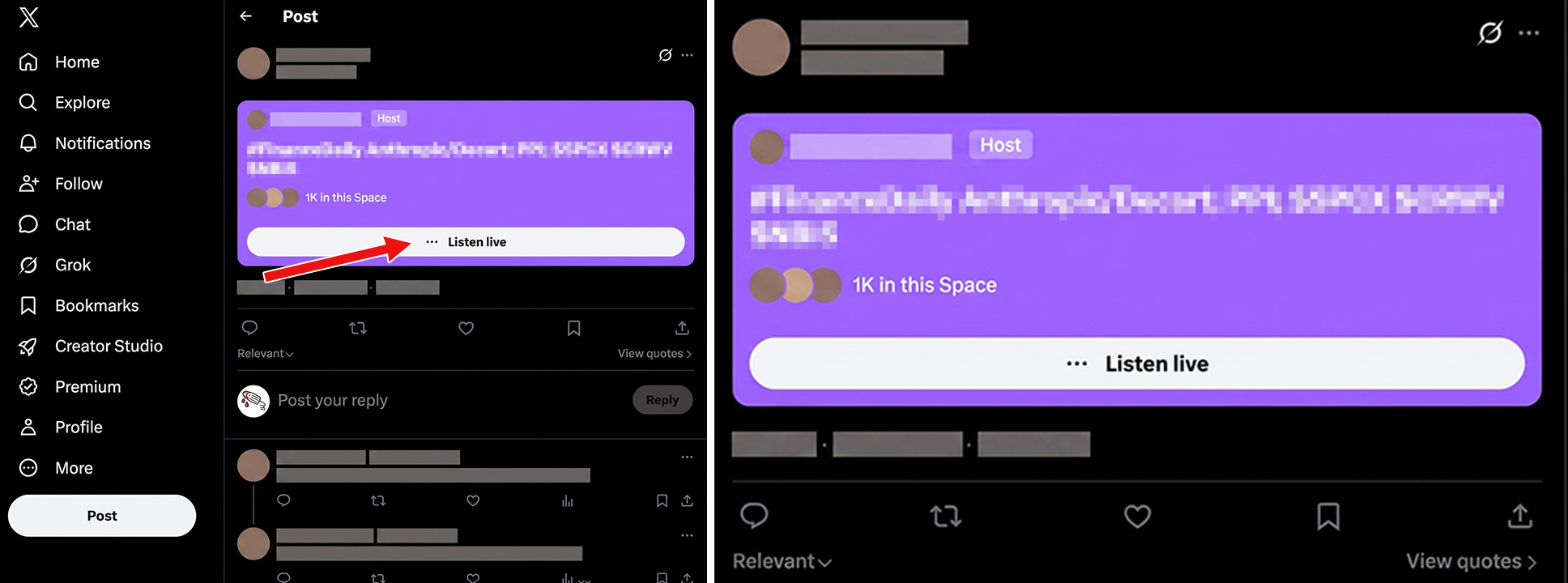
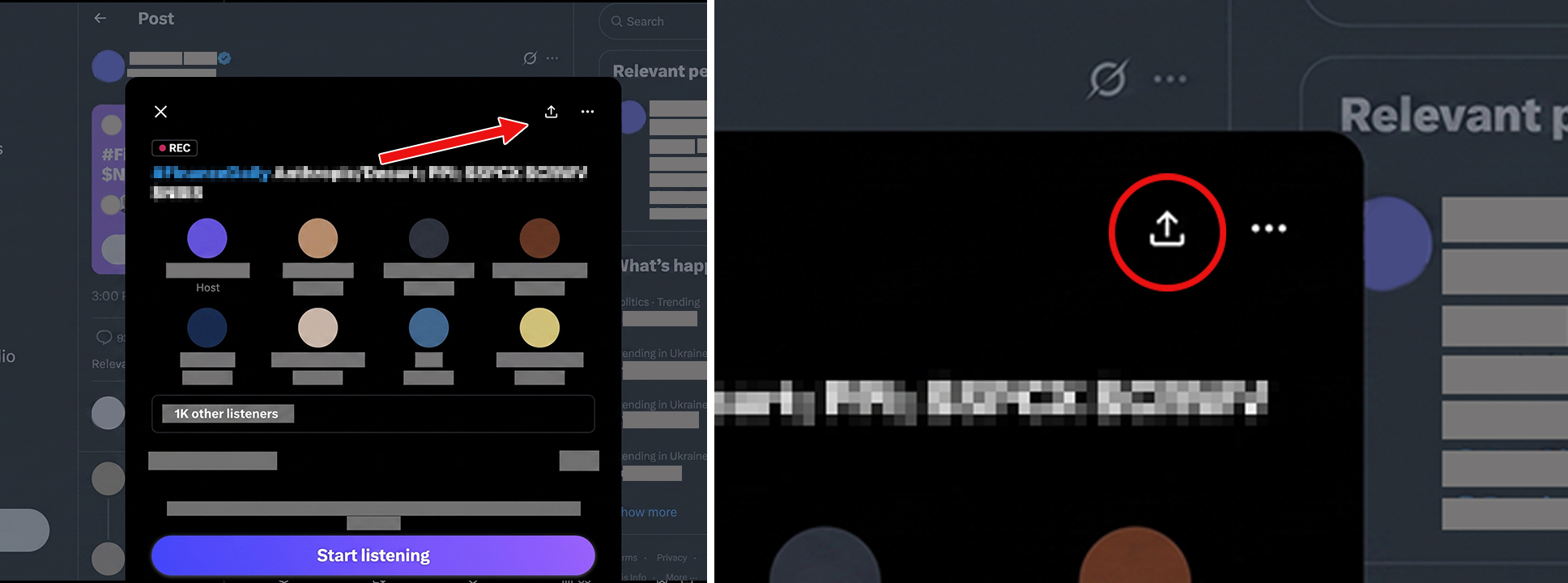
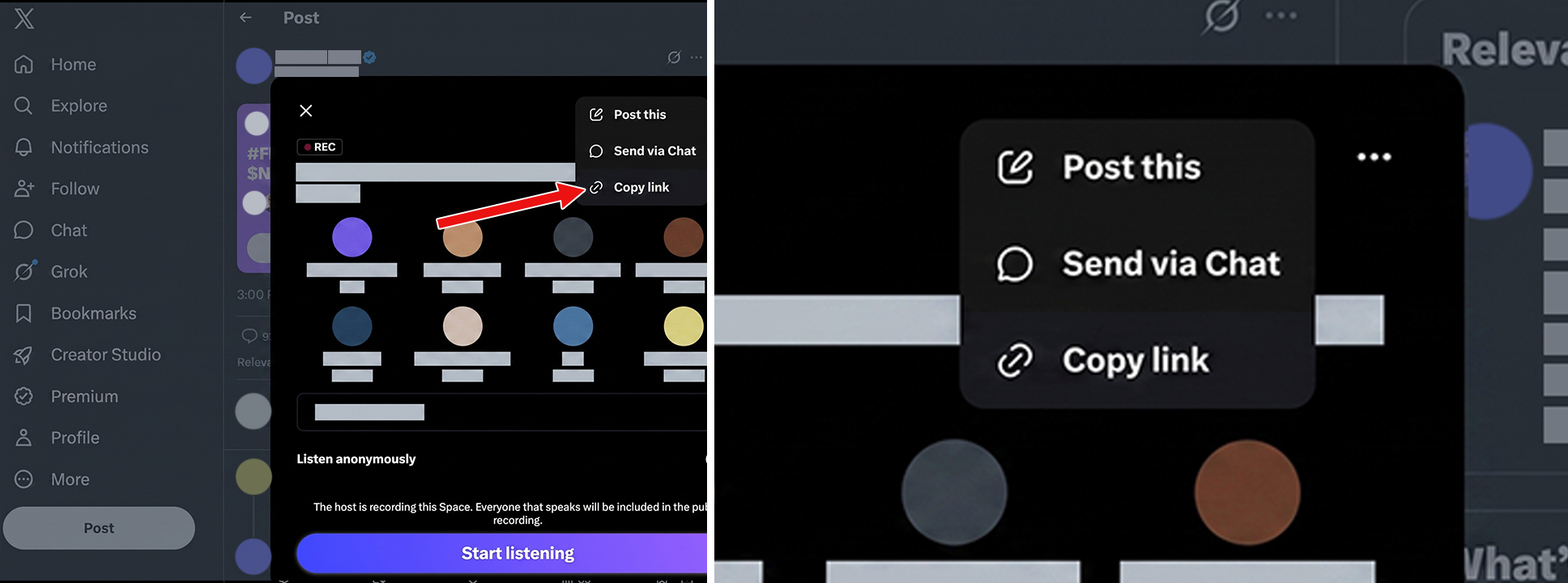
How to get an audio space link?

Requirements
For the audio recorder:
- FFmpeg
- Internet connection
- Valid X cookies or OAuth credentials depending on the feature
Who Is It For?
X Space Recorder is built for anyone who needs a reliable local copy of an X Space — whether for research, content production, documentation, or personal archiving.
📰 Journalists & Media Teams
Preserve interviews, public discussions, press conversations, and breaking-news Spaces before they disappear or become difficult to access.
Use it to:
- Archive source material
- Review conversations later
- Keep a local copy for editorial research
🔬 Researchers & Analysts
Capture public discussions for research, qualitative analysis, media monitoring, and documentation.
Use it to:
- Build an archive of conversations
- Analyze recurring topics and discussions
- Preserve audio for later review
- Keep recordings organized with automatic filenames and metadata
🎙️ Podcasters & Content Creators
Use it to:
- Save interviews and discussions
- Capture high-quality audio
- Record the audio recording
- Keep chat and reactions as additional context
📣 Community Managers & Social Media Teams
Monitor and document important community conversations, AMAs, launches, panels, and live discussions.
Use it to:
- Create internal archives
- Review what was discussed
- Preserve important community events
- Keep a record of speakers, participants, and chat activity
💻 Developers & Automation Enthusiasts
Use a command-line tool that fits naturally into local scripts, servers, CI environments, and custom archival workflows.
Use it to:
- Automate recording workflows
- Run recordings on a VPS or server
- Build custom archiving pipelines
- Integrate recordings into your own tools and storage systems
🗂️ Anyone Who Doesn't Want to Lose an Important Space
Sometimes a Space is simply worth keeping.
Record an important conversation, interview, announcement, educational discussion, or community event and keep the resulting files on your own machine.
What Can You Use It For?
Archive Important Conversations
Create your own searchable or organized collection of Spaces that matter to you.
Research & Documentation
Preserve discussions as reference material for research, reporting, analysis, or historical documentation.
Content Production
Use recorded audio as source material for podcasts, transcripts, summaries, social clips, and editorial projects.
Interviews & Public Events
Keep a complete recording of interviews, AMAs, panels, launches, and other live conversations.
Internal Knowledge & Reference
Organizations and communities can preserve important public discussions for future reference instead of relying on a live broadcast remaining available.
Personal Archiving
Keep a local copy of conversations, educational sessions, or other Spaces you want to revisit later.
Please make sure you have the right to record, store, and reuse the content you capture. You are responsible for complying with applicable laws, platform terms, and the rights of speakers and other participants.
Why Use X Space Recorder?
You control the recordings.
Instead of relying on a third-party recording website, X Space Recorder runs locally and saves the resulting files to your own working directory.
One tool, multiple workflows.
Built for real-world interruptions.
Live streams end. Replays appear later. Networks fail. Recordings get interrupted. The recorder is designed to handle these situations without unnecessarily losing what has already been captured.
What the Product Does Not Do
X Space Recorder is a recording and downloading utility. It does not provide X accounts, X API access, or an X developer account.
You are responsible for using the software in accordance with applicable laws, X's terms, and the rights of the people whose content you record.
Unofficial Third-Party Software
X Space Recorder is an independent, unofficial tool.
It is not affiliated with, endorsed by, or sponsored by X Corp.
"X", "X Spaces", "Twitter", and related names and marks belong to their respective owners.
Product Development
X Space Recorder is actively evolving.
Future development will depend on user demand and the level of interest in the product. If the project gets enough support and real-world usage, new features, improvements, and workflow enhancements can be prioritized based on what users actually need.
By supporting the product, you're not just getting the current version — you're also helping shape what comes next.
Current Version
x-recorder v1.0.8
Get X Space Recorder
Record the Spaces that matter. Keep your own copy.
Download the project and start archiving X Spaces locally.
Can I pay with cryptocurrency?
Yes, we accept cryptocurrency payments. Please contact us by email for payment instructions and further details.